
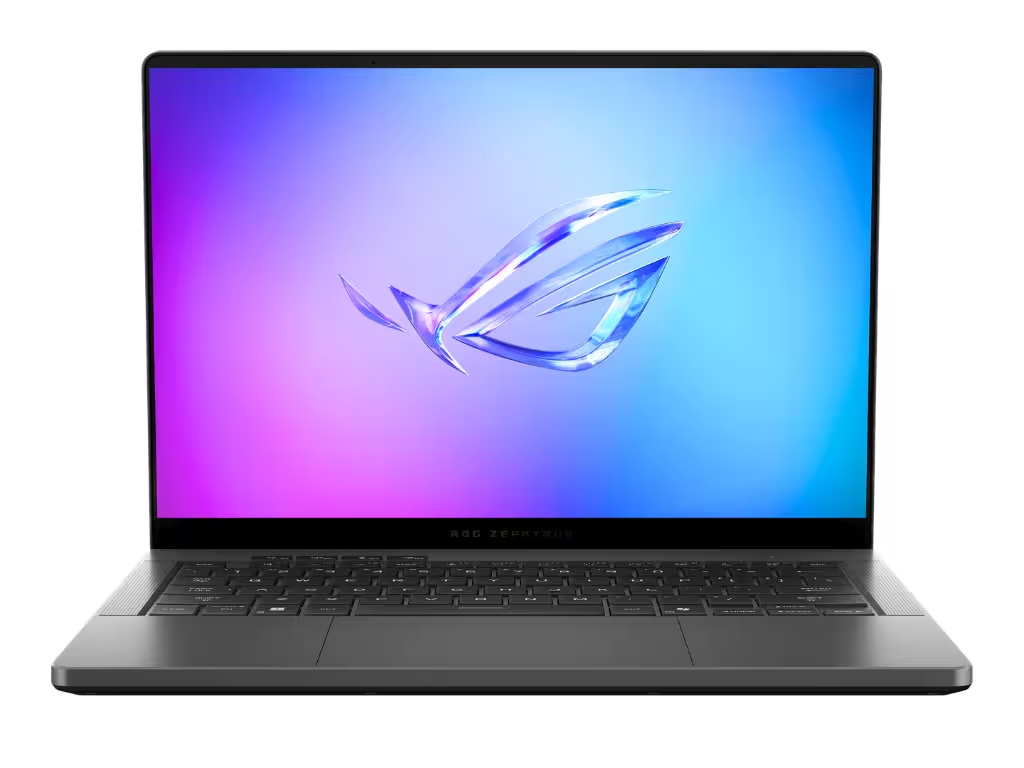
Asus ROG Zephyrus G14 Design: The Ultimate Windows MacBook Pro Alternative?
Premium CNC Aluminum Chassis
Let’s be honest, Asus finally listened. They completely ditched the chunky, plastic-heavy gamer aesthetic for a precision-milled 6063 CNC aluminum chassis. Weighing just 1.57 kg (3.46 lbs) and sitting at 1.83 cm thick, holding this thing genuinely feels like holding a stealthy MacBook Pro that happens to play AAA games.
The build quality is incredibly dense. There is zero keyboard flex. They also swapped the old, flashy AniMe Matrix for “Slash Lighting”—a sleek, diagonal white LED strip across the lid.
It’s subtle enough that you won’t feel embarrassed opening it in a corporate boardroom, but it still has enough edge for a weekend LAN party.
Thermal Bottlenecks: The Elephant in the Room
But here’s the catch: physics always wins. When you cram up to an NVIDIA RTX 5080 (110W max TGP) into a 14-inch ultralight frame, things are going to get toasty.
If you use this laptop completely flat on a standard desk, you are literally suffocating it. The bottom intakes desperately need fresh air. Without it, the system will aggressively thermal throttle during heavy gaming or 4K video rendering.
Lifting the back of the laptop isn’t just a recommendation; it’s mandatory. Also, a quick heads-up on maintenance: Asus uses factory-applied Thermal Grizzly Liquid Metal on the CPU.
Asus ROG Zephyrus G14 (2024 vs 2025): Which Specs Should You Buy?
AMD Strix Point & Blackwell GPUs
Navigating the G14 buying options right now is a bit of a minefield. The 2024 models use the AMD Ryzen 9 8940HS and RTX 40-series cards. They are still fantastic machines, but the 2025 iterations bring the Ryzen AI 9 HX 370 (Strix Point) and the new RTX 5000 Blackwell GPUs to the table.
What does that actually mean for you? Massive bandwidth improvements. The new GDDR7 memory on the RTX 5080 means textures in next-gen games load noticeably faster. Plus, the NPU hits 50 TOPS, making it fully ready for Copilot+ AI tasks.
| Component | 2024 G14 (Typical High-End) | 2025 G14 (Maximum Spec) |
|---|---|---|
| Processor (SoC) | AMD Ryzen 9 8940HS | AMD Ryzen AI 9 HX 370 |
| Graphics (GPU) | NVIDIA RTX 4070 (8GB GDDR6) | NVIDIA RTX 5080 (16GB GDDR7) |
| Memory (RAM) | 16GB / 32GB LPDDR5X (Soldered) | 32GB / 64GB LPDDR5X-8000 (Soldered) |
| Connectivity | Wi-Fi 6E | Wi-Fi 7 (802.11be) |
The Soldered RAM and Storage Trap
Here is the most frustrating part about the redesign: the RAM is fully soldered to the motherboard. There are zero expansion slots. What you buy today is what you are stuck with forever.
With modern games like Cyberpunk 2077 or Battlefield eating memory for breakfast, 16GB is rapidly becoming a bottleneck for a premium-tier machine.
Storage is equally annoying. There is only one M.2 NVMe slot inside. If you want to upgrade, you can’t just drop in a second drive; you have to clone your entire OS to a new SSD and swap them out.
ROG Nebula Display & Audio: A Masterpiece with One Annoying Flaw
The 3K 120Hz OLED Panel
The 14-inch 3K OLED screen (2880×1800) is easily one of the best panels I’ve ever seen on a laptop. Running at 120Hz with a ridiculously fast 0.2ms response time and G-Sync, games look incredibly fluid.
Colors pop right out of the box thanks to Pantone validation and 100% DCI-P3 coverage. And yes, it has a MUX Switch with Advanced Optimus, so the dedicated GPU connects directly to the screen for maximum framerates.
But—and this is a big “but”—Asus went with a heavily glossy glass finish. Sure, it makes the OLED blacks look infinitely deep in a dark room, but in the real world? It’s a mirror.
If you’re trying to work outside, in a bright coffee shop, or under harsh office lights, you’ll be constantly fighting reflections.
Six-Speaker Dolby Atmos Setup
Acoustically, though, the G14 absolutely destroys its Windows rivals. It packs 6 speakers (4 woofers, 2 tweeters) driven by a smart amp that monitors temperatures so the cones don’t blow out at max volume.
I’ll say it: this is the only 14-inch Windows laptop that actually sounds as good as a 14-inch MacBook Pro. The bass is punchy, and the volume gets surprisingly loud.
Real-World Performance and the “Modern Standby” Nightmare
AAA Gaming Power vs Portability
When you have this laptop propped up on a desk, it’s an absolute beast. Pushing the RTX 5070 Ti or 5080 on native 3K resolution is a breeze for most modern titles. The Wi-Fi 7 chip also guarantees super-low latency for competitive shooters.
However, content creators, take note: there is no full-size SD card slot. Asus only included a MicroSD reader. So, if you shoot on standard SD or CFexpress, you’re going to need a dongle, which kind of defeats the “ultra-portable” vibe.
Acoustics and Sleep Mode Issues
When you engage Turbo mode, prepare for takeoff. The fans regularly hit over 50 dBA, and it’s a high-pitched whoosh. You will absolutely need closed-back headphones for long gaming sessions.
But the biggest issue isn’t the fan noise; it’s a Windows 11 flaw known as “Modern Standby.”
First-Day Setup Guide: Essential G14 Accessories
Cooling Stands and Armoury Crate Tweaks
Since the chassis chokes its own airflow when flat, your very first purchase should be a minimalist aluminum folding riser or stealth adhesive kickstands. Don’t buy those massive, clunky cooling pads; just elevate the back of the laptop an inch off the desk.
Once you boot it up, head straight into Armoury Crate (Asus’s control software). Set the MUX switch to ‘Ultimate’ for plugged-in gaming, and ‘Eco’ when you’re taking it to class or a meeting. Also, make sure to turn on the OLED Care features (like pixel shifting) to avoid burn-in.
Wi-Fi Fixes and 100W PD Charging
A lot of users report Wi-Fi dropping randomly out of the box. The quick fix? Disable Windows “Fast Startup” and download the latest Wi-Fi drivers directly from Intel or MediaTek, rather than waiting for the Asus update tool.
Finally, take advantage of the 100W USB-C Power Delivery port. You need the heavy 200W brick for full-power gaming, but for a normal workday, grab a small 100W GaN charger. It keeps the laptop topped up and saves your back from carrying extra weight.
Frequently Asked Questions (FAQ)
What is the current price of the Asus ROG Zephyrus G14 and where can I find deals?
Pricing heavily depends on the generation you choose. The 2024 models (RTX 4060/4070) frequently see aggressive discounts at major retailers like Best Buy, often dropping below $1,400 during sale events. The newer 2025 models featuring RTX 5000 series GPUs command a premium, typically starting above $1,800. If you are on a budget, monitoring open-box deals is your best bet.
Can I upgrade the RAM on the Zephyrus G14 later?
No. Starting with the recent redesigns, the RAM on the Zephyrus G14 is entirely soldered to the motherboard. There are no SO-DIMM slots available. You must purchase the exact amount of RAM you will need for the laptop’s entire lifespan on day one. We strongly recommend the 32GB configurations.
How much does the Zephyrus G14 actually weigh?
The Asus ROG Zephyrus G14 is an incredibly portable machine, weighing just 1.57 kg (3.46 lbs). The CNC aluminum chassis is 31.1 x 22.0 cm, with a thickness that tapers from 1.59 cm at the front to 1.83 cm at the rear hinge. It fits easily into standard 13-inch laptop sleeves.
How is the battery life on the OLED G14 for normal tasks?
If you set the laptop to ‘Eco Mode’ (which disables the dedicated RTX GPU) and lower the screen refresh rate to 60Hz, you can reasonably expect around 7 to 9 hours of battery life for light productivity, web browsing, and video playback. Gaming on battery will kill it in under 90 minutes.
Does the Asus G14 get too hot to use on my lap?
For light tasks like watching Netflix or writing documents, it stays comfortably cool. However, during heavy workloads or gaming, the aluminum chassis acts as a giant heatsink and gets uncomfortably hot, especially near the top of the keyboard deck. You should never play AAA games with this laptop resting directly on your lap.